
Practice interviews out loud. Answer from your own notes. Silent when it counts.
A Windows app that trains you out loud and, where AI help is allowed, answers from your own notes. It comes with Essentials and Premium.
Already on a plan? Download JBWhisper Documentation


- Windows 10 and 11
- Compliance Mode on by default
- Your notes stay on your computer
JBWhisper is a Windows interview app. Before an interview, it trains you with spoken practice questions. During practice, or a session where AI assistance is allowed, it listens, finds relevant facts in your own notes and drafts an answer in your own words. Compliance Mode is on by default. If an employer has not allowed AI during a real interview, JBWhisper does not generate answers.
Practice out loud with a voice interviewer, drill single questions and learn how you actually speak.
02AI interview copilotListens, recognises the question, searches your own notes and writes an answer grounded in them.
03Full Compliance ModeEvery session declares what it is. Restricted interviews get no generated answers and no coding solutions.
Watch
JBWhisper in 30 seconds
Training out loud, the copilot where AI help is allowed, and Restricted Live, where it writes nothing. The screens in the clip are the real app.
Read the transcript
Job interview tomorrow? This changes how I prepare. JBWhisper interviews me out loud, asks follow-ups, and shows where my answers ramble. When AI help is allowed, it listens, finds the facts in my own notes, and suggests an answer I can say my way. And when it isn't? Restricted Live. No generated answers, no coding help. It stays quiet. JBWhisper Interview Copilot. Included with JobBlynt Essentials and Premium.
01 · Interview training
How does JBWhisper train you for an interview?
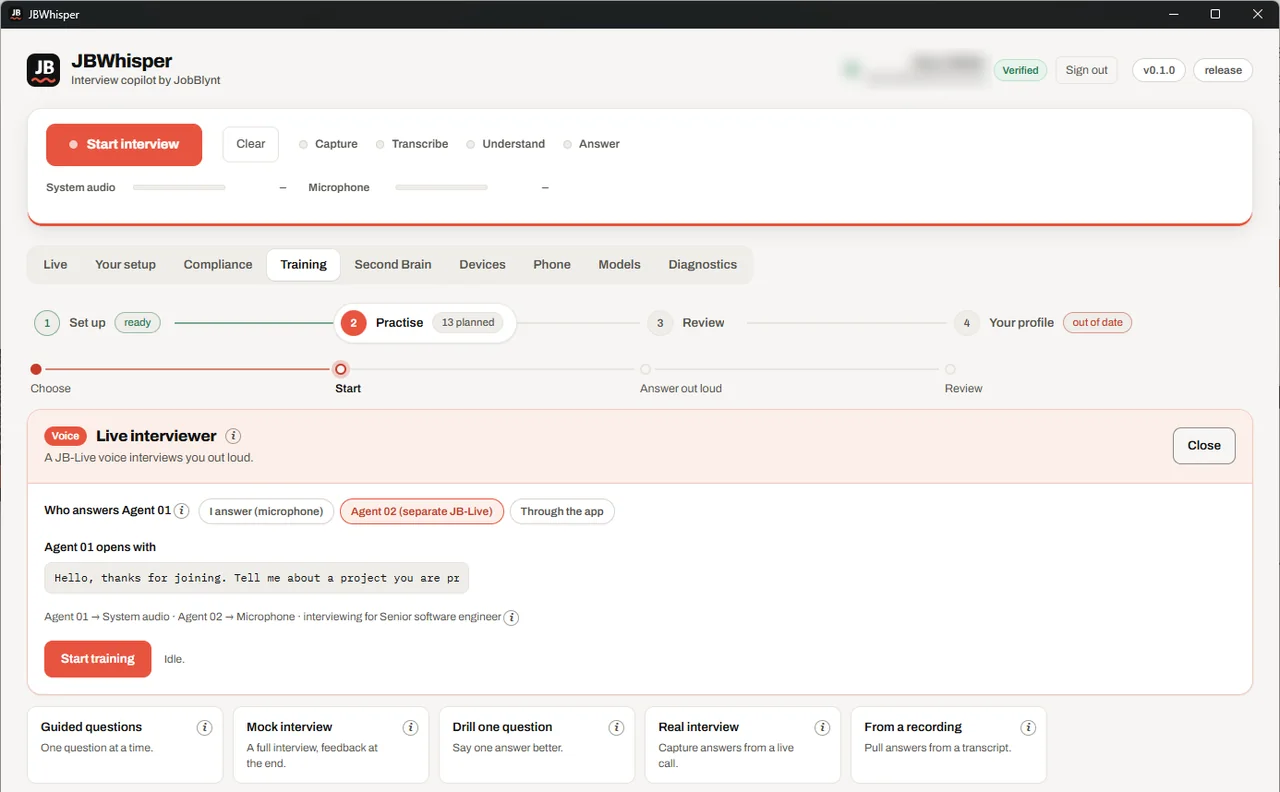
Training follows four steps in the app: set up your microphone and language, practice, review what you said, and keep your profile up to date. You answer out loud, the way you will in the interview, and JBWhisper listens. In training it never writes an answer for you — capturing yours is the point.
Practice modes for every stage of preparation
- Live interviewer: a voice model interviews you out loud and follows up instead of simply taking the answer
- Guided questions, one at a time, and a full mock interview with feedback at the end
- Drill one question until the answer is better than the last one
- Pull your answers from a recording or a transcript of a real call
- A plan for the evening, such as 13 questions across 4 subjects in about 8 minutes
Training against your own professional context
Questions come from the subjects in your profile and the notes you keep, so you practice the interview you are actually going to have. JBWhisper counts which subjects you have covered and how well, and says plainly what is still missing.
Answers that sound like you
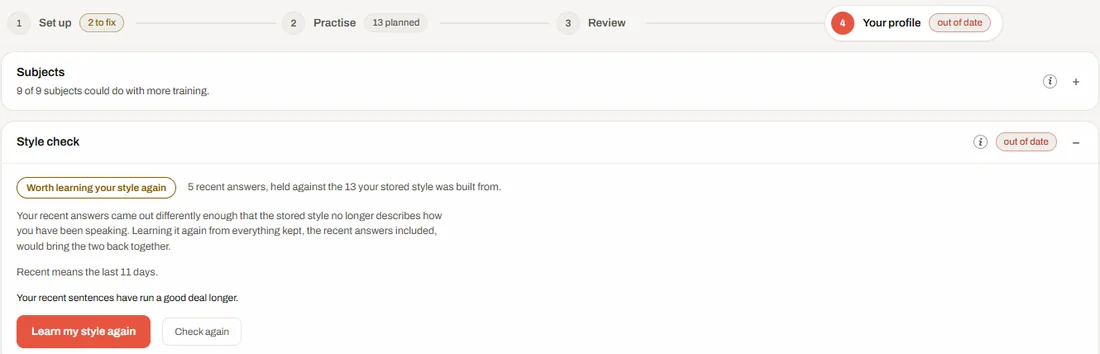
From the answers you keep, JBWhisper learns how you speak — sentence length, tone, how directly you get to the point. When your recent answers drift from that style, the style check says so and offers to learn it again.
02 · Interview copilot
What does the AI interview copilot do during an interview?
During practice, or an interview where you have confirmed AI assistance is allowed, JBWhisper follows four steps: capture audio, transcribe it, detect a question, and prepare an answer. The answer appears in a small window above your call. It is written for speaking, not reading aloud.
- CaptureYour microphone and the call's audio, each as its own source.
- TranscribeReal-time speech to text, shown line by line.
- UnderstandA model decides whether this is a question yet and what answering it takes.
- AnswerEvidence from your notes, fused into a short answer in your chosen voice.

Your Second Brain: answers grounded in your own notes
Point JBWhisper at a folder of Markdown notes — an Obsidian vault works as it is — and it indexes your profile, projects and experience on your computer. Word and PDF documents can be read into it too. Before answering, it searches that vault, judges whether the evidence is enough, and only then writes. An answer may claim what your notes support, and nothing more.
Answer voices
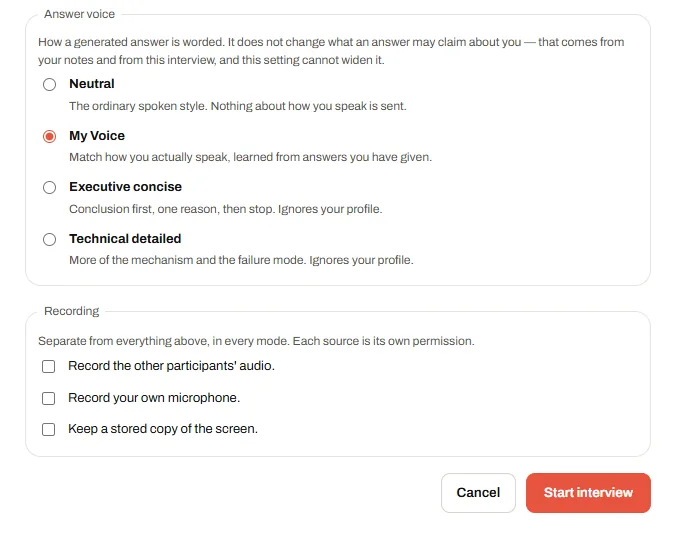
- My Voice: matched to how you actually speak, learned from answers you gave
- Neutral, Executive concise (conclusion first, one reason, stop) and Technical detailed
03 · Full Compliance Mode
What is Full Compliance Mode?
Interview rules differ: some employers allow AI help, most assessments do not, and only the people running the interview can say which applies. JBWhisper does not guess. Before every session you say what kind of session it is, and what the app may do follows from that answer. Compliance Mode is on from the first start and after every update — having used the app before is never read as permission.
Controls it applies
- Ten separate permissions: transcription, note search, session memory, live answers, coding answers, screen analysis, sending content to an AI provider, and recording
- Recording the other participants, recording your own microphone and keeping a copy of the screen are three different permissions, each needing your declaration that the others agreed
- The rules are enforced in the app's core at the moment of use, not only greyed out on screen
- No features for evading proctoring or detection; an automated test scans the code to keep it that way
What it does not claim
Verified AI Live records your statement that AI assistance is permitted; JBWhisper does not check that with anyone, and never labels it otherwise. Compliance Mode keeps the app within the limits you declare. It cannot make an interview's rules for you, so ask the employer when in doubt.
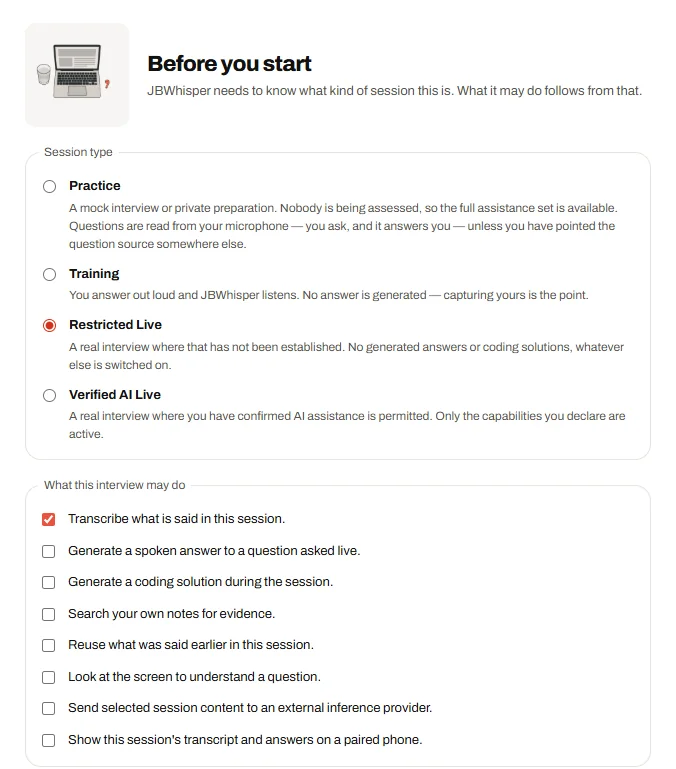
The four session types
| Session type | When to use it | Generated answers |
|---|---|---|
| Practice | A mock interview or private preparation | Yes — nobody is being assessed |
| Training | You answer out loud and JBWhisper listens | No — capturing your answer is the point |
| Restricted Live | A real interview where AI help has not been allowed | No answers and no coding solutions, whatever else is switched on |
| Verified AI Live | A real interview where you have confirmed AI assistance is permitted | Only the capabilities you declare |
Plans
Included with JobBlynt Essentials and Premium
JBWhisper is not sold on its own. It comes with the JobBlynt plans that already prepare you for interviews, at one price paid once, with no subscription.
Essentials
- JBWhisper for Windows
- One resume rewritten: ATS and recruiter versions
- 50 jobs scored, 10 tailored
- 20 interview cards to prepare with
Premium
- JBWhisper for Windows
- Every resume you upload, and your LinkedIn
- 120 jobs scored, 25 tailored with cover letters
- 40 interview cards and a case study
Personal review (€199) includes everything in Premium, JBWhisper too. Already on a plan? Download JBWhisper.
Questions about JBWhisper
Is it allowed to use an AI interview copilot in a job interview?
It depends on the interview. Some employers allow AI help, many assessments forbid it, and only they can say. Choose Restricted Live when AI help has not been allowed: JBWhisper then writes no answers and no coding solutions.
Which JobBlynt plans include JBWhisper?
Essentials (€39), Premium (€79) and Personal review (€199). Each is a one-time price with VAT included and no subscription. After buying, the download is on the JBWhisper page in the app.
Does JBWhisper record my interview?
Not unless you ask it to. Recording the other participants, your own microphone and the screen are three separate permissions, and each needs your declaration that the others agreed.
Can I use JBWhisper only to prepare?
Yes. The Training and Practice sessions involve nobody else, so every feature is available there: voice interviews, mock interviews, drills and the style check.
Does JBWhisper run on a Mac?
Not yet. JBWhisper is a Windows 10 and 11 app. The rest of JobBlynt runs in any browser.
System requirements and privacy
- Windows 10 or 11, 64-bit. An MSI installer, and a setup that installs for your user without administrator rights
- Sign in with a JBWhisper account. If you use your own OpenAI or OpenRouter key, it is kept in Windows Credential Manager and sent only to that provider
- Your notes, answers and recordings are stored on your computer
- To transcribe and answer, the parts of a session that need it are sent to an AI provider, and only when the session type allows it
- macOS and Linux are not available yet