Before an interview · Step 5
Session types and Compliance Mode
Every session starts by saying what it is. What JBWhisper may do follows from that answer, and Compliance Mode is on from the first start.
Start interview: say what the session is
- Press Start interviewThe Before you start dialog opens.
- Choose the session typePractice, Training, Restricted Live or Verified AI Live.
- For a real interview, tick what it may doTranscribe, answer live, write code, search your notes, reuse earlier parts of the session, look at the screen, send content to an AI provider, show it on a paired phone.
- Choose the answer voiceNeutral, My Voice (how you actually speak), Executive concise or Technical detailed. The voice changes how an answer is worded, never what it may claim.
- Decide on recordingRecording the other participants, your own microphone and a copy of the screen are three separate permissions.
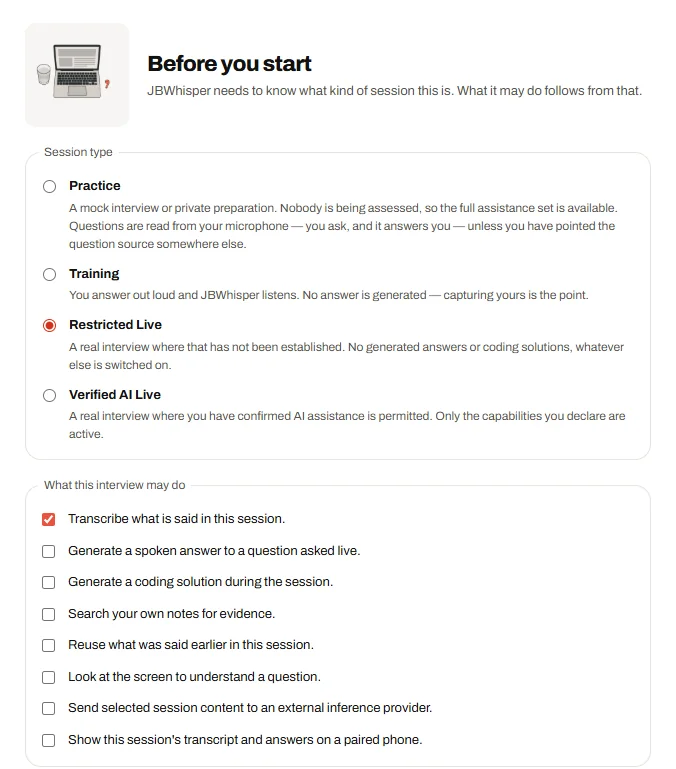
The four session types
| Session type | For | Generated answers |
|---|---|---|
| Practice | A mock interview or private preparation | Yes |
| Training | You answer out loud and JBWhisper listens | No — capturing yours is the point |
| Restricted Live | A real interview where AI help has not been allowed | No answers and no coding solutions, whatever else is on |
| Verified AI Live | A real interview where you have confirmed AI assistance is permitted | Only the capabilities you declare |
!
“Verified” names the situation, not a check
Verified AI Live records your statement that AI assistance is permitted. JBWhisper checks it with nobody. Ask the employer when in doubt.
Compliance Mode
- On by default, on a new install and after every update — having used the app before is never read as consent
- Only an authorised administrator or an eligible Lifetime account can switch it off, by accepting a versioned responsibility agreement that is stored with the account
- Switching it off relaxes the session rules and nothing else: it never authorises recording and never means an employer approved anything
- There are no features for evading proctoring or detection; an automated test scans the code to keep it that way
